import numpy as np
import matplotlib.pyplot as plt

import skimage as ski

from skimage.transform import SimilarityTransform, warp, rotate
fatal: not a git repository (or any of the parent directories): .git
fatal: not a git repository (or any of the parent directories): .git
The bare SimilarityTransform default (not considering inverses) has the visual effect of an anti-clockwise rotation around 0, 0.
img = ski.data.chelsea()
angle_rad = 0.3
tf =  SimilarityTransform(rotation=angle_rad)
warped = warp(img, tf)
plt.imshow(warped);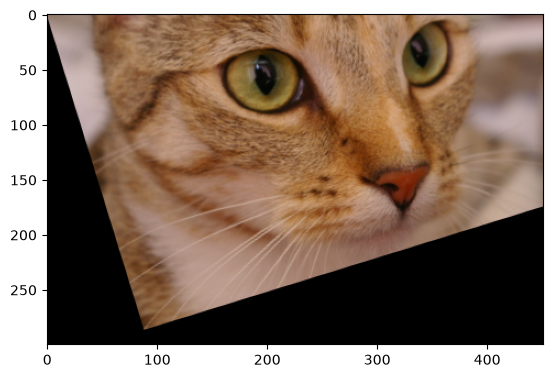
Rotate specifies in its docstring that it does a “counter-clockwise” rotation around the image center.
Most unfortunately it uses degrees.
angle_deg = angle_rad / np.pi * 180
rotated = rotate(img, angle_deg)
plt.imshow(rotated);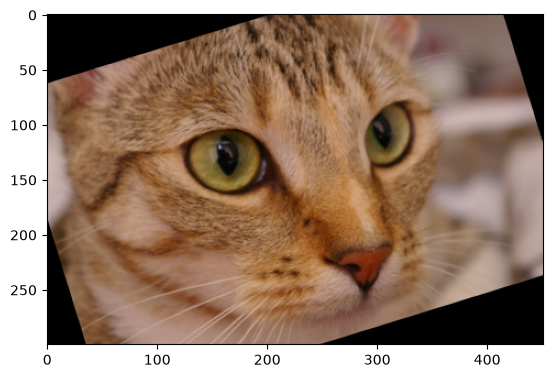
This correspondence is misleading though, because one should better think of the transform tf to warp as being the inverse or pull map, mapping a coordinate from the output array to a coordinate in the input array. Thus tf encodes (in skimage) a clockwise rotation of coordinates.
x_line = np.arange(8)  # Columns in array!
y_line = np.zeros_like(x_line)  # Rows in array!
coords = np.column_stack([x_line, y_line])
out_coords = tf(coords)

plt.plot(coords[:, 0], coords[:, 1], 'bo', alpha=0.5, label='input coords')
plt.plot(out_coords[:, 0], out_coords[:, 1], 'ro', alpha=0.5, label='output_coords')
plt.gca().invert_yaxis()  # To match imshow's display.
plt.legend()
plt.title('Coordinate transformation on a line');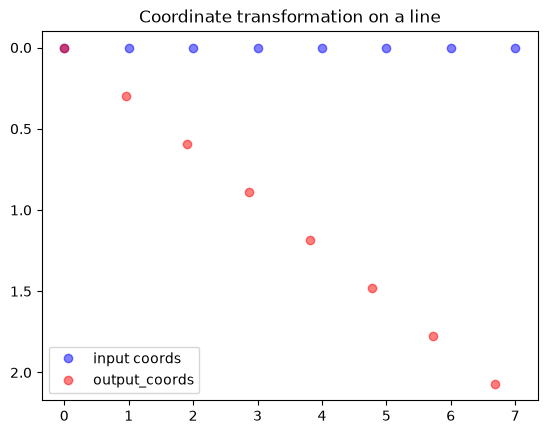
So, the coordinates rotate (in skimage) clockwise. But because the transformation we specify to warp is the output-to-input transform, this has the effect of pulling data from the input image from the transformed points, so the resulting rotation (here) is anti-clockwise. Therefore, the user, thinking carefully, might instead expect the following to be the rotation matching rotate:
# The output-to-input transform for the rotation.
itf =  SimilarityTransform(rotation=angle_rad).inverse
re_warped = warp(img, itf)
plt.imshow(re_warped);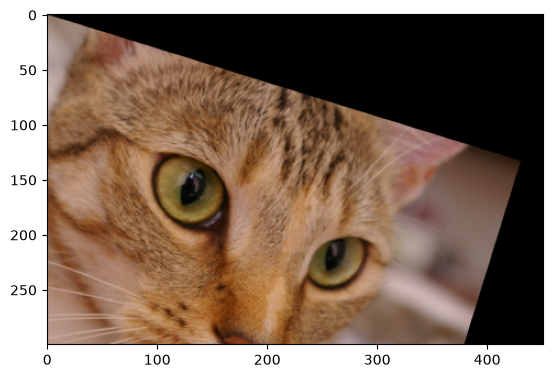
The point here is that the match between rotate(img, angle_deg) and warp(img, SimularityTransform(angle_rad)) somewhat depends on how the user reasons about the forward / inverse or pull / push nature of the transform passed to warp. It is more or less an accident that the non-inverse version of the warp call matches the current rotation direction of rotate, and we have not specified this anywhere.
In skimage2 we will reverse the meaning of rotations, in particular, as we go from xy (column, row) to ij (row, column) coordinate interpretations. This means that warp(img, SimularityTransform(angle_rad)) will have the visual effect of a anti-clockwise rotation, no longer matching the visual behavior of rotate. But given that there are two different interpretations that one could have for the SimilarityTransform rotation, and that the .inverse interpretation is better conceptual match, it’s reasonable to allow this change. This has the benefit that we don’t have to change the behavior of the widely-used rotate and swirl.